
Per-app volume for macOS
Volume for every app.
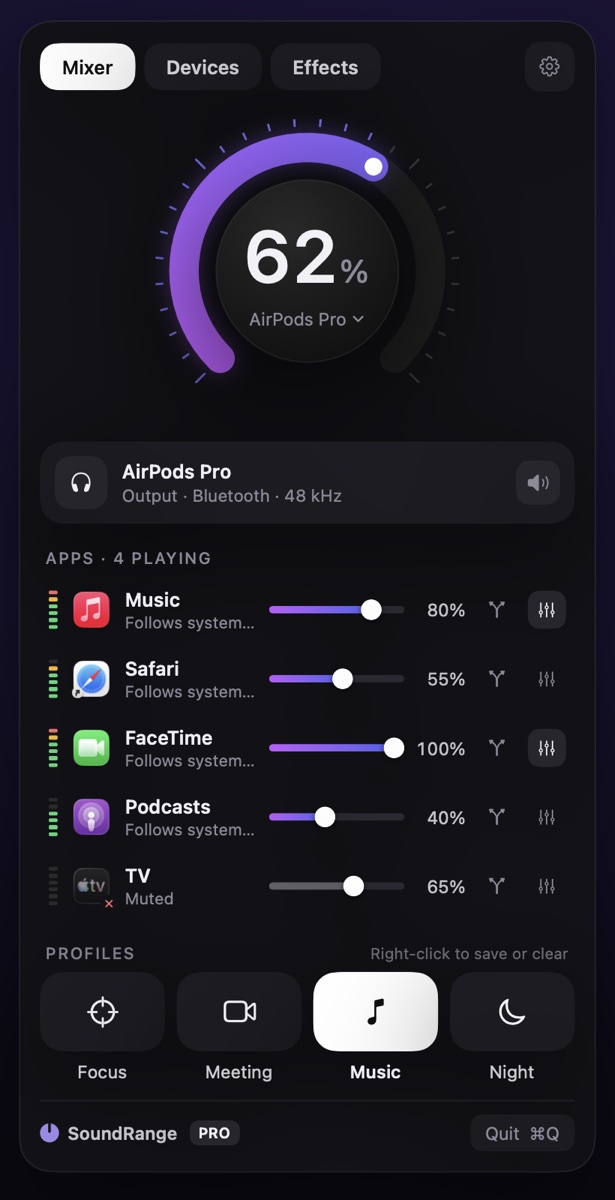
SoundRange lives in your Mac's menu bar. Turn each app up, down or off, send it to its own speakers, and shape it with a 10-band EQ.
What it does
Free, with a Pro upgrade
Per-app volume
A slider, mute and live meter for every app making sound.
Output switching
Pick speakers, headphones or a display in one click, with volume for displays that have none.
Per-app output PRO
Music on your speakers while a call stays on your headphones.
10-band EQ PRO
Presets like Bass Boost and Vocal Clarity, or your own curve, for each app.
Louder PRO
Volume Overdrive to 150% and Magic Boost for small laptop speakers.
Profiles and more PRO
Profiles, device groups, priority devices, shortcuts, Do Not Disturb and Prevent Sleep.
Pricing
Pay once. No subscription.
Free
$0
Everything you need to control each app's volume.
- Volume and mute for every app
- Live level meters
- Output volume dial, with scroll and keyboard control
- Switch speakers, headphones and displays
- Volume for displays without their own
Pro
US$12.99 one time
Everything in Free, plus:
- Per-app output: send each app to its own speakers
- 10-band EQ for every app, with presets
- Volume Overdrive to 150% and Magic Boost
- Device groups and priority devices
- Profiles and keyboard shortcuts
- Do Not Disturb and Prevent Sleep
- Shortcuts app actions
Try every Pro feature free for 14 days.
Pro is an in-app purchase in the Mac App Store, shared with your family through Family Sharing. The App Store shows the price in your local currency, which can differ from the US price.
Help
Common questions
Why does SoundRange ask for System Audio Recording?
To change one app's volume, SoundRange passes that app's sound through itself on its way to your speakers. macOS calls this System Audio Recording and asks you to allow it once. Nothing is recorded, saved or sent anywhere; the sound only passes through. SoundRange has no network access at all.
SoundRange says it can't hear my apps
- Open System Settings → Privacy & Security → Screen & System Audio Recording.
- Turn on SoundRange under "System Audio Recording Only".
- Quit SoundRange and open it again.
I can't find the icon in the menu bar
On a MacBook with a notch, macOS hides menu bar icons that don't fit. Open SoundRange again from Applications or Spotlight and its window appears. To make room, quit other menu bar apps, or hold ⌘ and drag icons to rearrange them.
An app doesn't appear in the list
Apps appear as soon as they play sound, usually within a second. If one doesn't, make sure it's actually playing (not paused) and that audio access is allowed (see above). Some apps send sound through a helper process; SoundRange groups those under the app when it can.
How do I try or restore SoundRange Pro?
Click Upgrade to Pro at the bottom of the SoundRange window, or any control with a lock. Choose Try everything free for 14 days to start the trial, or Restore Purchases on a new Mac. Pro is shared with your family through Family Sharing. When a trial ends, your Pro settings are kept and come back as soon as you unlock Pro.
How do profiles work?
Set up a mix (volumes, mutes, outputs, EQ), then click an empty profile tile to save it. Click a tile to switch to it. Right-click a tile to save the current mix into it or clear it. A tile is highlighted while your mix matches it.
What are device groups?
A group plays to several outputs at once, like speakers in two rooms. SoundRange creates it as an output macOS can use too, and removes it from your Mac when SoundRange quits.
How do I uninstall SoundRange?
Quit SoundRange (the Quit button at the bottom of its window), then drag it from Applications to the Trash. All its audio connections end when it quits, and every app sounds exactly as before.
Contact
Still stuck?
Email us with your macOS version and what you see, and we'll help you sort it out.